In-person training
Work through eMARx with a trainer. Staff can ask questions, practise tasks and receive feedback during the session.

Training & support
Guided training videos, Quick Reference Guides and online assessments are included with eMARx. Laptops supplied by eMARx also have a practice version of the system, so staff can try the tasks shown in the videos.
In-person and live online sessions with a trainer are available at an additional cost. Contact us to discuss what your staff need and get a price.
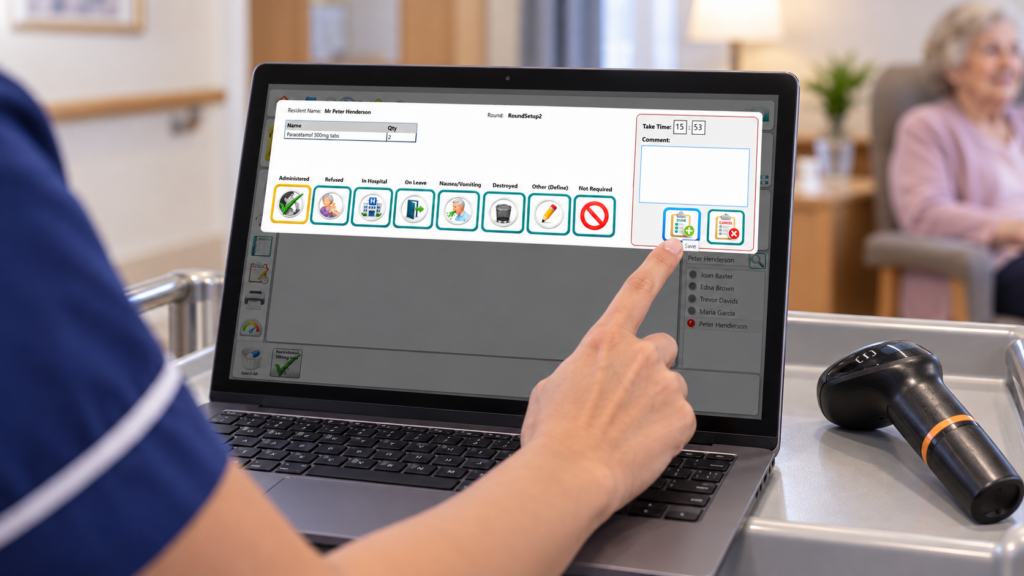
Demonstration data shown.
Work through eMARx with a trainer. Staff can ask questions, practise tasks and receive feedback during the session.
Join a trainer remotely for demonstrations and questions. We’ll agree what staff can practise during the session, based on the equipment available.
Watch nine recorded sessions showing how to use eMARx. Pause to practise in the demo system or replay a section when you need a reminder. You can also watch without following along.
After training—or if you already use eMARx—take an assessment to check your knowledge. Questions you get wrong are saved to revisit, with links to the relevant training chapters.
The demo is a practice version of eMARx on the laptops we supply. It uses demonstration data so staff can try tasks before working with live resident records.
1
Watch the video demonstration.
2
Pause the video and try the same task in the demo system.
3
Replay a chapter for a reminder. Follow the video’s reset instructions before repeating an exercise.
Staff should complete training before going live, either in person, remotely or through our guided training videos.
What training is included? Read the quick answer.
We remotely supervise medication Check-In for your first and second cycles.
On your first day using eMARx, we stay on a Teams call throughout the morning medication round. If you need to give early-morning medication, we’ll try to arrange the call to cover that first round at the time you need.
Telephone technical support is available from 7am to 9pm, 365 days a year. You’ll speak to a real person, and we can connect remotely to your device to help while you’re on the phone.
Watch training videos, use Quick Reference Guides, take assessments and view your certificates in the Learning Hub.
Managers can review staff assessment progress, current certificates and renewal dates for the homes assigned to them.
Set targets for how many staff need each certificate and choose how early renewal warnings appear.
You can exclude assessment topics that your care setting does not use. Any excluded topics are listed on the certificate.
“I have to feed back that the training delivered yesterday was fantastic and really comprehensive. Tom was brilliant.”
“The transformation in the team has been wonderful to see. Colleagues are more knowledgeable and confident, with a much stronger understanding of medication management.”
“The transformation in the team has been wonderful to see. Colleagues are more knowledgeable and confident, with a much stronger understanding of medication management. The system, together with the support behind it, has become an important part of helping us embed safer and more confident practice.”
“Since the implementation of eMARx, our experience has been very positive. The trainers have been extremely helpful throughout the process, providing clear guidance and support. The support team has also been proactive, regularly contacting us whenever we have raised concerns or needed assistance, which has greatly helped staff confidence in using the system.”
“Since the implementation of eMARx, our experience has been very positive. The trainers have been extremely helpful throughout the process, providing clear guidance and support. The support team has also been proactive, regularly contacting us whenever we have raised concerns or needed assistance, which has greatly helped staff confidence in using the system.
The system is user-friendly and straightforward to navigate, particularly during medication administration. Staff have found it easy to use, and the reporting features are comprehensive and beneficial for audits, monitoring, and compliance purposes.
Overall, we are very satisfied with the system and the level of support provided.”
Tell us how many staff need training, what they need to cover and your preferred dates. We’ll confirm availability and the cost before you book.
Up to 500 characters. Please include training requirements only; do not include resident information. You can add more detail in your email app.
You can also email sales@emarx.co.uk and include your training requirements. If your email app does not open, copy this address into your usual email service.